
Leads
Local stores
Find independent shops on Google Maps, read what their customers say, and track which ones you've contacted. Available on request.
If you sell to shops rather than to people on LinkedIn, Local stores finds them for you. It searches Google Maps in an area, reads each store's reviews, and puts the stores whose customers mention your keywords first.
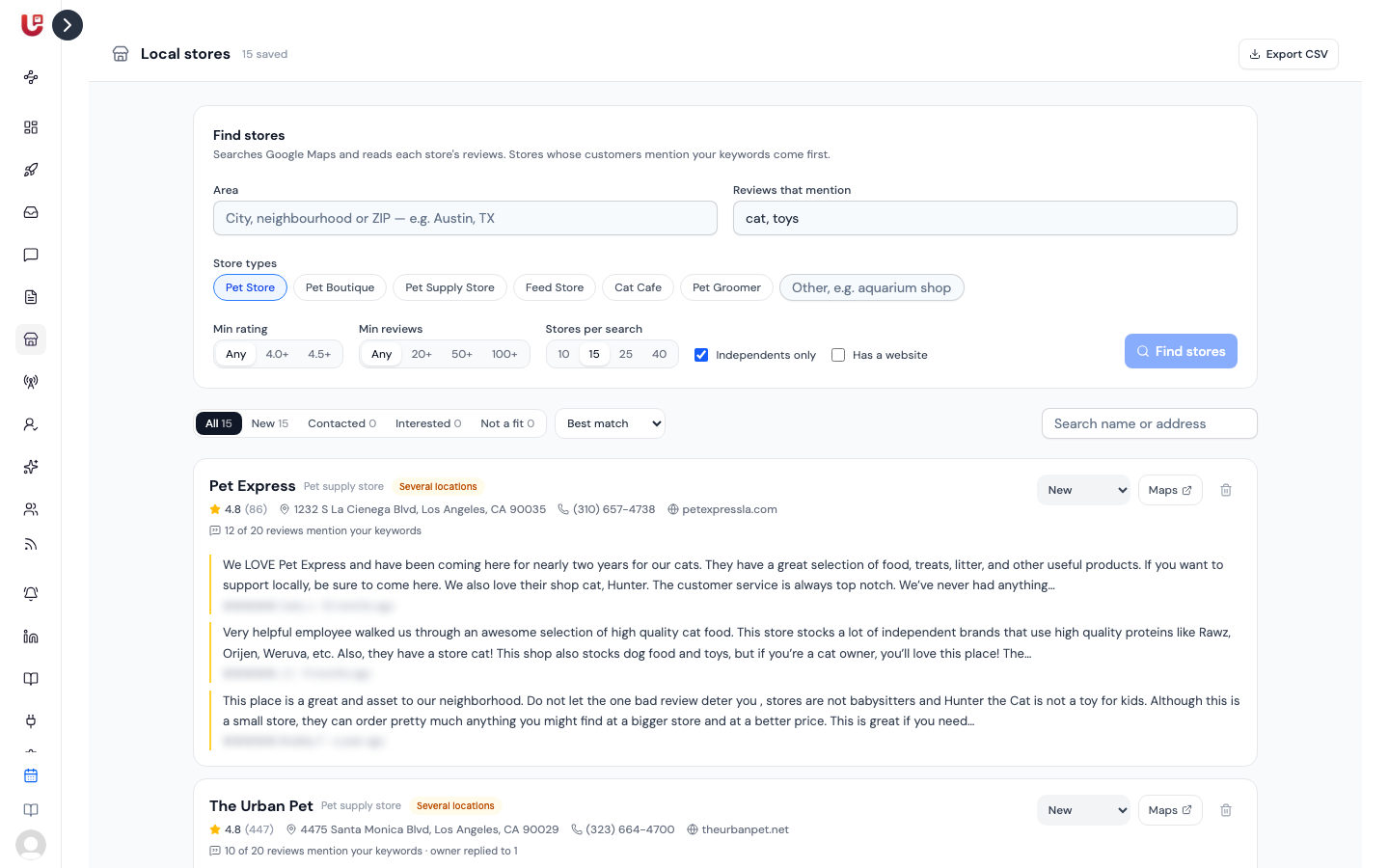
Local stores is available on request. When it's on for your workspace, Local stores appears under Lead gen in the sidebar. Contact us to switch it on.
Finding stores
Fill in Find stores:
| Field | What to enter |
|---|---|
| Area | A city, neighbourhood or ZIP code, e.g. "Austin, TX". Required. |
| Reviews that mention | Comma-separated keywords, e.g. "cat, toys". Stores whose reviews mention them rank first. |
| Store types | Tick the preset types, or type your own under Other. Pick at least one. Up to four are searched at once. |
| Min rating | Any, 4.0+ or 4.5+ |
| Min reviews | Any, 20+, 50+ or 100+ |
| Stores per search | 10, 15, 25 or 40 |
| Independents only | Skips national chains. On by default. |
| Has a website | Only stores that list a website |
Click Find stores. A search takes up to a minute. New stores are added to your list. Stores you already have aren't added twice.
You can run up to 20 searches a day.
Reading a store
Each store card shows:
- Name, category, star rating and number of reviews
- Address, phone number and website
- Several locations when the same shop turned up at more than one address
- How many of the reviews checked mention your keywords, and how many the owner replied to
- Up to three reviews, with the ones that praise and mention your keywords first. Owner replies show underneath.
Click Maps to open the store on Google Maps.
Tracking your outreach
Give each store a status from the dropdown on its card:
- New
- Contacted
- Interested
- Not a fit
The tabs above the list filter by status and show a count for each. You can also filter by area, search by name or address, and sort by Best match, Most reviews, Highest rated or Newest found.
Click the bin icon to remove a store.
Exporting
Click Export CSV at the top of the page. It exports the stores you're looking at, so set the status tab, area and search first. The file includes each store's name, status, category, address, phone, website, rating, review count, keyword mentions, Maps link and area.
Tips
- Owners who reply to reviews read them. They're more likely to read your message too.
- Reviews that mention your keywords make a good opener: "Your customers keep mentioning your cat toys."
- Your list keeps the 300 most recent stores. Export before running lots of new searches if you want to keep older ones.