
Signals
Tech Stack
Find companies by the technology they use, adopted or dropped, and capture the right people inside them.
A Tech Stack signal finds companies by the technology they use. Then it finds the people at those companies with the job titles you choose, and captures them as leads.
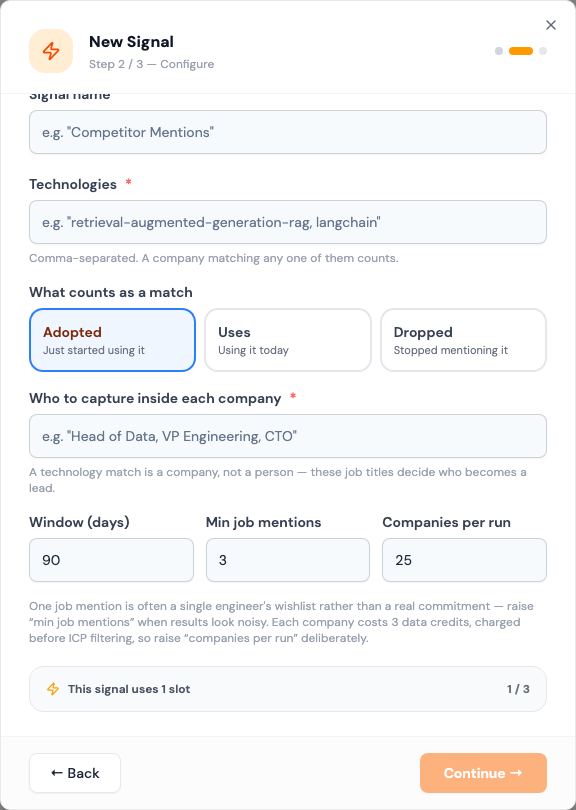
A technology match is a company, not a person. The titles you enter decide who becomes a lead.
When to use it
- You sell something that works with, or replaces, a specific tool.
- You want companies that just brought a tool in. They're mid-build and still choosing vendors.
- You want companies that just moved off a competitor.
Modes
What counts as a match decides when a company qualifies.
| Mode | Matches companies that… | How Updately knows |
|---|---|---|
| Adopted | Started using it within the window. The default. | From the company's job posts, dated |
| Uses | Use it today | From the company's website |
| Dropped | Stopped mentioning it within the window | From the company's job posts, dated |
Adopted is usually the strongest. A company that just took on a technology has budget moving and decisions still open.
Job posts reveal backend, data and AI tools well, but miss companies that aren't hiring. Websites reveal front-end tools well, such as analytics, chat and e-commerce platforms, but can't see what runs behind the scenes. Pick the mode that suits your technology.
Fields
| Field | What to enter |
|---|---|
| Technologies | Comma-separated. A company using any one of them counts, e.g. "snowflake, databricks". Required. |
| What counts as a match | Adopted, Uses or Dropped |
| Who to capture inside each company | Comma-separated job titles, e.g. "Head of Data, VP Engineering, CTO". Required. |
| Window (days) | Adopted and Dropped only. How far back to look. 7 to 1,825. Default 90. |
| Min job mentions | Adopted and Dropped only. How many job posts must mention the technology before a company counts. Default 3. |
| Companies per run | 1 to 100. Default 25. |
How it works
- Updately finds up to Companies per run companies matching your technologies and mode.
- At each company it looks for people with your titles. It takes up to three people per company and 60 per run.
- People are enriched, scored and checked against your ICP, then added to your lists.
The first run starts as soon as you save. After that it runs once a day.
Companies per run is the volume dial. Raise it deliberately. A higher number means more companies checked each day, whether or not their people pass your ICP.
What to expect
Leads arrive in small groups, a few per company. Some companies won't have anyone with your titles, and they bring no leads.
When a run saves fewer than 15 new leads, the card shows Leads running low. See Leads running low.
Tips
- One job mention is often a single engineer's wishlist. Raise Min job mentions when results look noisy.
- Common technologies match all kinds of companies. A popular e-commerce platform turns up consultancies and agencies that hire for it. Use your ICP to keep the industries you want.
- Give several titles per function: "Head of Data, Data Engineering Manager, Director of Data".
- Before saying "I see you just moved to X" in a message, check the company's site. Adopted means their job posts started mentioning it, which usually but not always means a switch.