
Workspace & settings
Billing and subscription
The plans, what each one includes, and how to start, change or manage your subscription.
Your plan sets how many LinkedIn accounts you can connect and what Updately does for you. You manage it on the Billing & Subscription page.
Getting there
- Click your name at the bottom of the sidebar, then Account. Under Billing & Usage, click Manage Subscription.
- Or click Upgrade wherever you hit a plan limit — on the Accounts page or the Signals page.
Your current plan
The Manage Subscription box at the top shows the plan you're on. If you're subscribed, it also has a Manage Subscription button. That opens a secure billing portal where you can update your card, see invoices and change or cancel your plan.
Plans
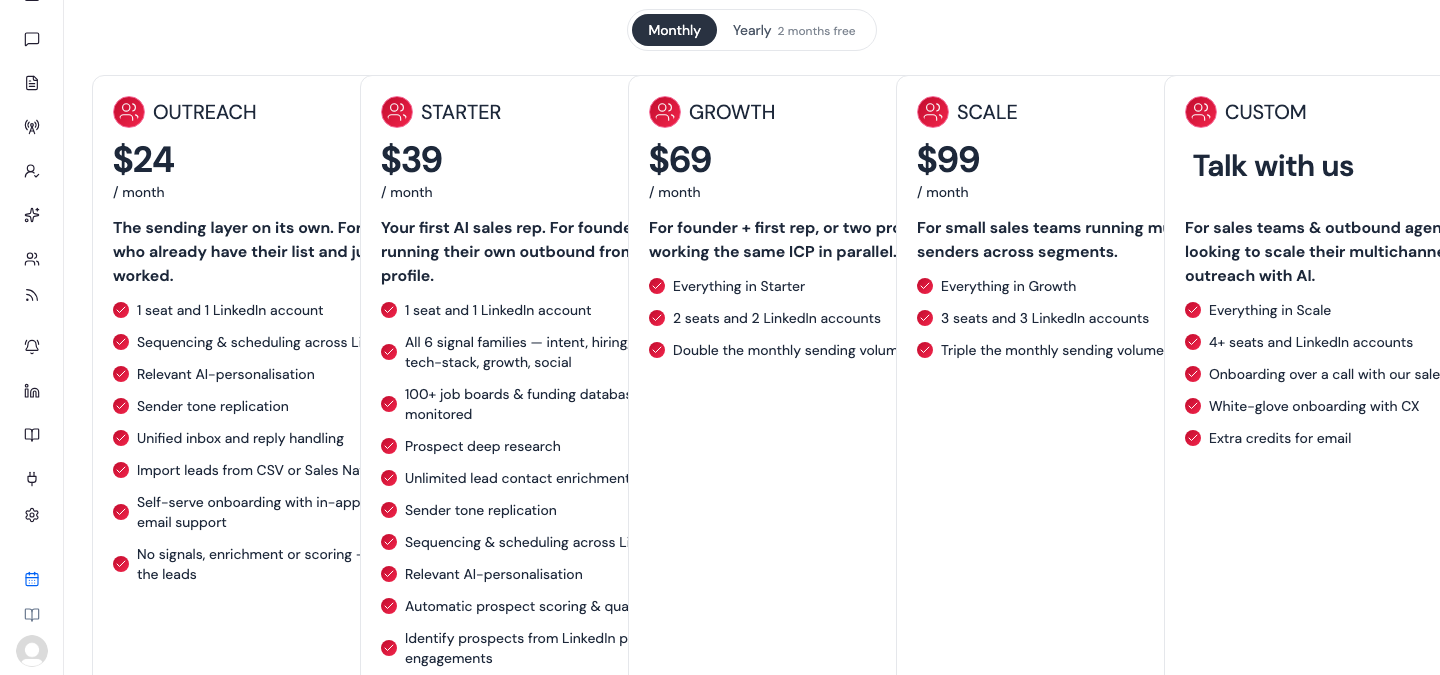
Use the Monthly / Yearly switch to see either price. Yearly billing gives you two months free.
| Plan | Monthly | Yearly | Seats and LinkedIn accounts |
|---|---|---|---|
| Outreach | $24 | $228 | 1 |
| Starter | $39 | $390 | 1 |
| Growth | $69 | $690 | 2 |
| Scale | $99 | $990 | 3 |
| Custom | Talk with us | Talk with us | 4+ |
What each plan is for
- Outreach — the sending layer on its own, for people who already have their leads. Sequencing, AI personalisation, the unified inbox, and importing leads from CSV or Sales Navigator. No signals, enrichment or scoring.
- Starter — your first AI sales rep, for founders running outbound from one profile. Every signal type, prospect research, unlimited lead enrichment, automatic scoring, and everything in Outreach.
- Growth — everything in Starter with 2 seats and 2 LinkedIn accounts, and double the monthly sending volume.
- Scale — everything in Growth with 3 seats and 3 LinkedIn accounts, and triple the monthly sending volume.
- Custom — 4 or more seats and LinkedIn accounts, onboarding over a call, and white-glove setup. Click Get a demo to talk to us.
If a plan isn't shown on your billing page, it isn't available to buy right now.
Starting a plan
If you're not subscribed yet, each plan has a Start 10-day free trial button. Click it and complete checkout.
Changing plan
If you're already subscribed, the buttons read Upgrade or Switch plan, and your current plan shows Current Plan. Changing plan goes through the billing portal, so you're never billed for two subscriptions at once.
What limits apply
- LinkedIn accounts. The Accounts page shows how many you're using out of your plan's allowance. When you're at the limit, Add account is disabled until you upgrade or disconnect one. See LinkedIn accounts.
- Signals. The Signals page shows how many signal slots you're using. When you're at the limit, pause a signal, cut down keywords in an existing one, or upgrade for more slots.