
Signals
Warm Lookalike
Paste the LinkedIn profile of a great customer and find more people like them.
A Warm Lookalike starts from one person: a customer who bought fast and gets real value. Updately reads their profile and builds a recurring search for people like them.
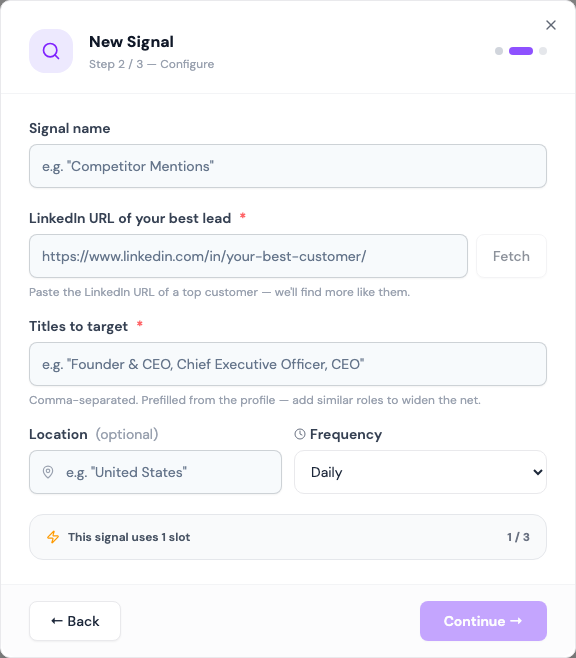
Under the hood a Warm Lookalike is a Profile Search. After you save it, it shows on the Signals page as Profile Search and works the same way.
Before you start: connect a LinkedIn account.
Setting it up
- Paste the customer's profile into LinkedIn URL of your best lead and click Fetch.
- Updately shows their name, title, company and location, and fills in Titles to target and Location from them.
- Under Search scope, AI suggests more to target:
- Include similar roles adds titles that do the same job under another name.
- Include related industries adds industries close to the customer's.
- Remove any suggestion that doesn't fit, or type your own and press Enter. Click Generate suggestions for more.
- Pick a Frequency, then route the leads to a list.
Fields
| Field | What it does |
|---|---|
| LinkedIn URL of your best lead | The customer to copy. Required. |
| Include similar roles | Adds the suggested titles to the search. On by default. |
| Include related industries | Limits the search to the suggested industries. On by default. |
| Titles to target | Comma-separated. Prefilled from the profile. Required. |
| Location | Optional. Prefilled from the profile. |
| Frequency | Daily, Every 3 days or Weekly |
Industries are matched to LinkedIn's official list. A name that doesn't match is skipped when you save.
What to expect
Each run finds up to 30 people and moves further down the results next time, just like a Profile Search. Everyone is enriched and scored against your ICP before landing in your list.
When a run saves fewer than 15 new leads, the card shows Leads running low. See Leads running low.
Tips
- Pick a customer whose title is common in your market. A unique title like "Chief Vibes Officer" finds nobody.
- Turn off Include related industries if results are thin. Industries narrow the search.
- The location comes from the customer's profile. Widen it to a country if they list a city.