
Signals
Network
Turn the LinkedIn connections you already have into leads, filtered by title, company or industry.
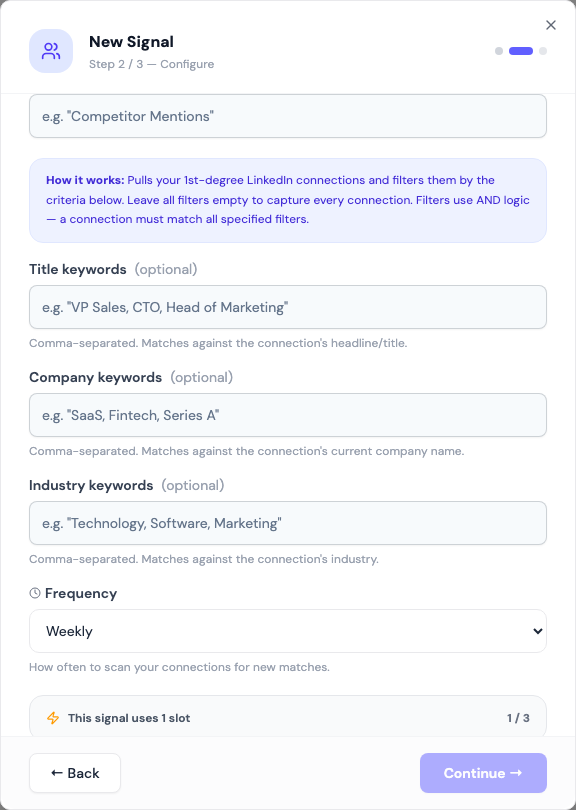
A Network signal works from people you're already connected to. It reads your 1st-degree LinkedIn connections, keeps the ones that match your filters, and adds them to your list.
These are the warmest leads you have. There's no connection request to wait on, so a campaign can message them straight away.
Before you start: connect a LinkedIn account. The signal reads that account's connections.
Fields
| Field | What to enter |
|---|---|
| Title keywords | Optional. Comma-separated, matched against the connection's headline, e.g. "VP Sales, CTO" |
| Company keywords | Optional. Matched against their current company name |
| Industry keywords | Optional. Matched against their industry |
| Frequency | Daily, Every 3 days, Weekly or Every 2 weeks. Weekly by default. |
Leave every filter empty to capture all your connections.
Matching ignores case and matches part of a word, so "sales" matches "Head of Sales". Within one field, any keyword can match. Across fields, a connection must match every field you filled in. If LinkedIn doesn't show a connection's company or industry, that filter is skipped for them, so your ICP is the safety net.
How it works
- Updately reads your connections.
- It keeps the ones that match your filters, up to 100 per run.
- They are enriched, checked against your ICP, and added to your lists.
What to expect
The first run picks up existing connections that match. Later runs mostly find people you've connected with since, so expect a burst and then a trickle.
When a run saves fewer than 15 new leads, the card shows Leads running low. For a Network signal that often just means you haven't made many new connections. See Leads running low.
Tips
- Headlines are written by people themselves. Add the variants you'd see: "Head of Sales, Sales Director, VP Sales".
- Use the ICP to drop students, recruiters and vendors from your network.
- Message connections differently from strangers. They know you already.