
Signals
Profile Search
Search LinkedIn profiles by title, keywords, company and location, and keep finding new matches on a schedule.
A Profile Search signal searches LinkedIn for people who match your criteria. It doesn't wait for anyone to post or hire, so it works from day one. That makes it the best first signal.
Before you start: connect a LinkedIn account. The search runs through it.
Two ways to search
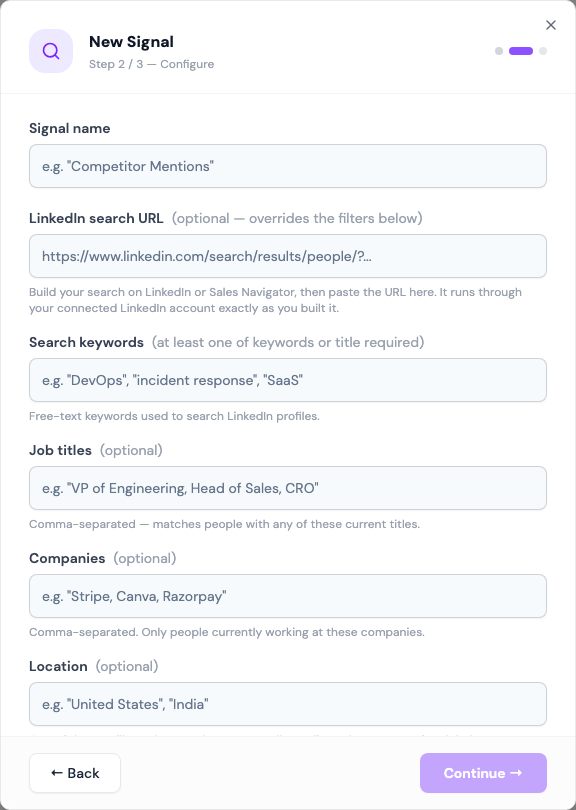
Fill in the filters. Enter titles, keywords, companies and a location.
Paste a LinkedIn search URL. Build the search on LinkedIn or Sales Navigator, with any filters you like, then copy the address bar into LinkedIn search URL. Updately runs that exact search through your account. A pasted URL overrides the filters below it.
A pasted URL is the way to use filters Updately doesn't show, such as seniority, function or "changed jobs in the last 90 days". A Sales Navigator URL needs a connected account with Sales Navigator.
Fields
| Field | What to enter |
|---|---|
| LinkedIn search URL | Optional. A people search from LinkedIn or Sales Navigator. |
| Search keywords | Free-text keywords, e.g. "incident response" |
| Job titles | Comma-separated. Matches people with any of these current titles. |
| Companies | Optional. Only people who work at these companies now. |
| Location | Optional. A country or city, e.g. "United States". Leave empty for anywhere. |
| Frequency | Daily, Every 2 days, Every 3 days or Weekly |
You need a search URL, keywords or at least one job title.
How it works
- Each run fetches up to 30 people from your search.
- Each person is enriched with their real job title and company, then checked against your ICP.
- The ones that pass are added to your lists.
The next run carries on further down the same results, so you get new people each time. When it reaches the end, it starts again from the top and picks up anyone new. LinkedIn shows at most about 1,000 people for any one search.
How often it runs
The first run starts as soon as you save the signal. After that it runs on the Frequency you picked.
What to expect
Up to 30 people per run, before your ICP. A tight ICP can drop many of them.
When a run saves fewer than 15 new leads, the card shows Leads running low with the reason. If the search has covered everyone it can find, widen it. See Leads running low.
Tips
- List several ways of writing the same role: "Head of Operations, Operations Lead, COO".
- Keep the location as wide as your ICP allows.
- Use the ICP for the fine filtering. Let the search be broad and let the ICP decide who fits.
- To find more people like one great customer, use Warm Lookalike.