
Listening & insights
The Feed
Where your matching posts land, what each card tells you, and how to filter and sort the Feed.
The Feed is where Updately puts the posts that match your keywords. Open it from Social Feed → Feed in the sidebar.
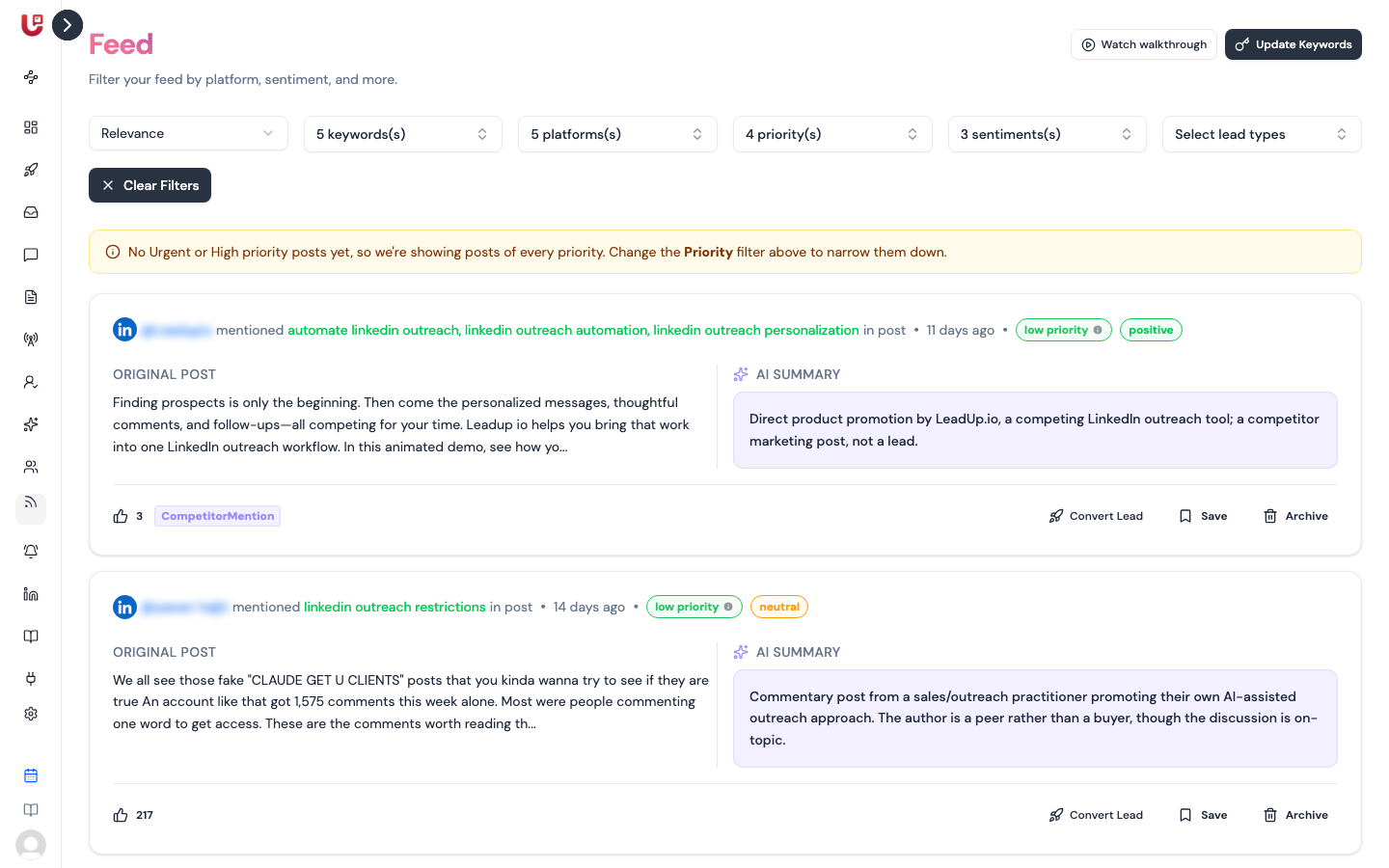
In LinkedIn outreach workspaces, the sidebar's Listening section has the Feed, Keyword Groups and Alerts. Saved Posts, Archived Posts, Feed Competitors, Reputation Management, SWOT and Preferences are in the sidebar of social listening workspaces.
Where posts come from
Updately searches Reddit, X (Twitter) and LinkedIn for the keywords in your keyword groups. Each group chooses which of the three it searches.
Before a post reaches your Feed, Updately:
- Drops it if it doesn't actually mention one of your keywords. Word forms count, so "hiring" matches "hire".
- Merges duplicates. A post that matches several keywords shows once, with every keyword it matched.
- Leaves out posts you've already saved or archived.
- Scores it with AI. See How posts are scored.
When you save a keyword group, Updately starts a search for it straight away. New posts can take a few minutes to appear.
The Update Keywords button at the top of the Feed takes you to Keyword Groups.
What's on a card
| Part | What it shows |
|---|---|
| Header | Platform, author, the keywords the post mentioned, the subreddit (Reddit), and how long ago it was posted |
| Priority badge | Urgent, High, Medium or Low. Urgent posts get a 🔥 |
| Sentiment badge | Positive, Neutral or Negative |
| Original post | The first part of the post |
| AI Summary | One or two sentences on why the post got its priority |
| Footer | Likes or upvotes, and the lead types the AI spotted, e.g. BuyIntent |
Click a card to open the full post. The panel shows the AI analysis, the post's overall score out of 100 (the Keyword Relevance bar), the full text and a View Post link to the original.
Filters and sorting
The bar above the Feed has one sort and five filters:
| Control | Options |
|---|---|
| Sort | Relevance (default), Latest, Priority |
| Keywords | Your keyword groups. All are selected by default |
| Platforms | Reddit, LinkedIn, Twitter |
| Priority | Urgent and High by default. Add Medium and Low to see more |
| Sentiment | Positive, Negative, Neutral |
| Lead types | Any of the AI's lead types, e.g. Buy Intent or Problem Overlap |
Clear Filters puts everything back to the defaults.
If you have no Urgent or High posts yet, the Feed shows every priority once and says so in a yellow note. Change the Priority filter to narrow it again.
The Feed loads ten posts at a time. Scroll down to load more.
Acting on a post
Every card has three actions:
- Save keeps the post in Saved Posts and takes it out of the Feed.
- Archive hides the post in Archived Posts. Use it for posts you've dealt with or don't care about.
- Convert Lead saves the author as a lead. It only shows for LinkedIn posts, or authors with a LinkedIn profile.
Open a post to draft a reply with AI. See Reply to a post.