
Signals
Post Engagement
Capture the people who react to or comment on LinkedIn posts — yours, a competitor's, or an industry voice's.
A Post Engagement signal captures people who reacted to or commented on LinkedIn posts.
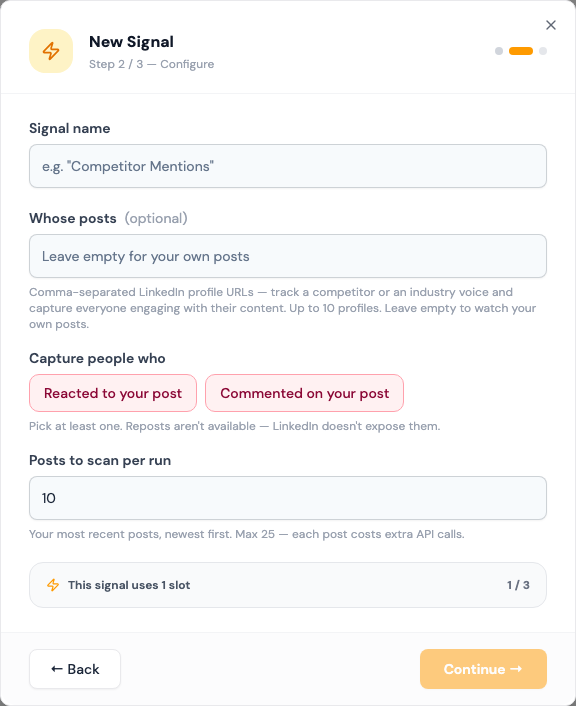
Pointed at your own posts, it's the warmest signal there is. These people have already seen you, so your message is a follow-up rather than a cold approach.
Pointed at someone else's posts, it finds an audience. Everyone engaging with a competitor's or an industry voice's content is showing interest in the topic.
Before you start: connect a LinkedIn account.
Fields
| Field | What to enter |
|---|---|
| Whose posts | Optional. Comma-separated LinkedIn profile URLs, up to 10. Leave empty to watch your own posts. |
| Capture people who | Reacted to your post, Commented on your post, or both. Pick at least one. |
| Posts to scan per run | How many recent posts to read for each profile, newest first. 1 to 25. Default 10. |
Reposts can't be captured. LinkedIn doesn't make them available.
How it works
- Each run reads the most recent posts of each profile you listed, or of your own account.
- It collects the people who reacted, commented, or both.
- Someone who engaged with several posts is captured once.
- Everyone is enriched, checked against your ICP, and added to your lists.
The signal runs once a day, starting as soon as you save it. People already in your list aren't added again.
What to expect
Volume follows engagement. A post with 200 reactions can bring a large batch of leads in one run. If you post rarely, most runs will be quiet.
When a run saves fewer than 15 new leads, the card shows Leads running low. See Leads running low.
Tips
- Watching other people's posts brings colder leads. Use a stricter ICP for those.
- Use Commented on your post alone when you want fewer, higher-intent people. Commenting takes more effort than reacting.
- Reference the post in your first message. It's the reason you're reaching out.